

 Request Support

How to set up a Primary School Facebook Account

This is an easy step by step guide of how to sign up to Facebook.
1) LOG IN OR CREATE AN ACCOUNT
When creating a page for your school, you will automatically be the administrator for this site. You have to manage “pages” using a personal facebook account, or create a new one (perhaps using a school email address). The choice is yours, but I find it easier to use my single personal account rather than switch between logins.
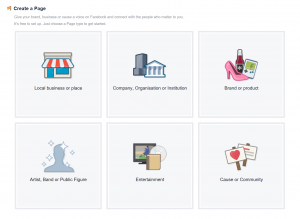
Creating a page with your existing personal Facebook account:
Ensure you are logged in to Facebook and visit: https://www.facebook.com/pages/create.php
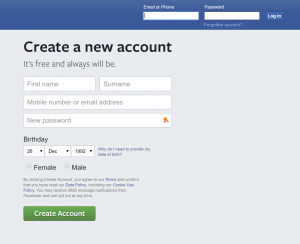
Creating a page with a new Facebook account:
Ensure you are logged out of your personal account and visit: https://www.facebook.com/
On the page you are directed to, you should be able to sign in, then ‘business or brand.’
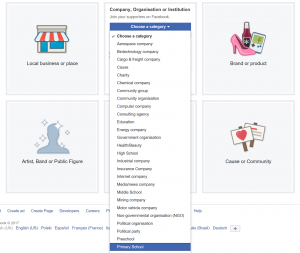
2) ACCOUNT TYPE
As we are making a school page on the drop down section select primary school. Enter your school name and click “Get Started”.
3) SCHOOL DETAILS
Here you are going to set up your school details, enter a description and profile picture (usually the school logo or photo of the school).
4) SECURE YOUR PAGE
Once you have all your information filled out and a profile picture set, you should be set up and ready to go. Next I will tell you how to secure your page.
There are a number of ways to protect your Facebook page: The first being selecting an audience for your content. Here you can choose people/pages you want to connect with, seen as it’s a school page I entered ‘Education’ and ‘Primary School’ this will put you in front of people who have pages similar to yourself.
Here you will want to go to settings in the top right hand corner, then across to your left hand side over to General, once on the general settings we can change a number of things to help secure your page. The first is disabling posts by other users on your page, this will not allow random users to post unnecessary content on your page. On the other hand this will limit interaction with other pages like yourself.
You have the option to allow people to contact your page privately by showing the message button on your page, of course you can untick this option if you do not want anyone messaging you.
Tagging ability, this gives you the option of allowing others to tag photos and videos published on your page, if this is something you don’t want just simply untick this option.
Age restriction, here you can choose what age range you think will best suit your page, this will allow you to target pages you feel best suit your page.
Page moderation, this section allows you to block post or comments containing the words you choose.
Profanity filter this is where you can choose whether to block profanity from your Page, and to what degree. Facebook determines what to block by using the most commonly reported words and phrases marked offensive by the community.
Customer Feedback
 Very helpful and kind staff, quick response and made a real difference to the school nativity. Thank you!2025-12-12 11:35:43Thankyou! Brilliant service,
Thankyou2025-12-12 11:22:43A swift resolution once again.2025-12-11 12:33:08Great experience with Jack Butterworth, very friendly and spot on all round.2025-12-10 16:22:34Fast response from Ahmet2025-12-09 15:04:18very quick response to the request2025-12-09 13:28:23Back up and running, thank you2025-12-09 12:01:43Thank you2025-12-09 10:57:19excellent service2025-12-09 09:33:41Very quick and efficient, helpful and communicative as usual. Thank you Heather2025-12-08 16:01:12John always does an amazing job supporting Aldwyn Primary School. No task is ever a problem, he is always very quick to help and update the website. We really appreciate his work. Thank you.2025-12-08 14:51:44Great response time. Thank you2025-12-08 09:41:36Thanks!2025-12-06 06:21:27Outstanding service and care from Mr Taylor, as is always the case2025-12-05 14:47:23Thanks for the quick response!2025-12-05 11:44:21Very swift and resolved without issue.2025-12-05 09:48:05Quickly fixed - thank you!2025-12-03 12:15:56Quick phone call with Adam and he's then resolved the issue in a few minutes.2025-12-02 13:42:58Excellent thank you :-)2025-12-01 17:03:26Really prompt service and just what we wanted
Thank you2025-12-01 15:35:55
Very helpful and kind staff, quick response and made a real difference to the school nativity. Thank you!2025-12-12 11:35:43Thankyou! Brilliant service,
Thankyou2025-12-12 11:22:43A swift resolution once again.2025-12-11 12:33:08Great experience with Jack Butterworth, very friendly and spot on all round.2025-12-10 16:22:34Fast response from Ahmet2025-12-09 15:04:18very quick response to the request2025-12-09 13:28:23Back up and running, thank you2025-12-09 12:01:43Thank you2025-12-09 10:57:19excellent service2025-12-09 09:33:41Very quick and efficient, helpful and communicative as usual. Thank you Heather2025-12-08 16:01:12John always does an amazing job supporting Aldwyn Primary School. No task is ever a problem, he is always very quick to help and update the website. We really appreciate his work. Thank you.2025-12-08 14:51:44Great response time. Thank you2025-12-08 09:41:36Thanks!2025-12-06 06:21:27Outstanding service and care from Mr Taylor, as is always the case2025-12-05 14:47:23Thanks for the quick response!2025-12-05 11:44:21Very swift and resolved without issue.2025-12-05 09:48:05Quickly fixed - thank you!2025-12-03 12:15:56Quick phone call with Adam and he's then resolved the issue in a few minutes.2025-12-02 13:42:58Excellent thank you :-)2025-12-01 17:03:26Really prompt service and just what we wanted
Thank you2025-12-01 15:35:55